I have a few Hue Play light bars next to the wall, but rarely end up using them. They either point directly at the wall and are more like a spotlight, or directly up at the ceiling (and then are in the line of sight and distractingly bright). I always wanted them mostly-hidden, but positioned with an upward angle to highlight travel photos I have printed. New 3D printer + learning 3D modeling + weekend...
Design
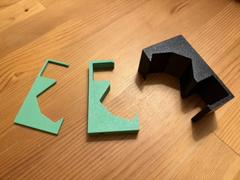
This was a fairly straightforward design, so I didn't even need AI to help me. I continue to rely on OpenSCAD to start my real-world models. I took some millimeter-precision measurements of the bookcase and light bar, and then coded up some shapes. I went through three iterations and prints before I was happy with it. It also was my first time using the Trim feature in Bambu Studio which helped me avoid printing the whole piece when I only needed to verify particular aspects of the bracket.
- First, the light bar was angled incorrectly and tight; and the lip for the shelf was too shallow.
- Fixed and then added a hole for the screw to securely attach it to the light bar.
- Finally printed the whole size. I switched to PETG Black in case the light bar gets warm. I pessimistically scaled it up an extra percent in size, but that turned out to be unnecessary.
Source Code
$fn = 256;

color("aliceblue") {
  translate([0, 0, 62]) {
    difference() {
      cube([40, 29.5, 30]);

      translate([0, 4, 0]) {
        cube([40, 26, 25.5]);
      }

      translate([0, 0, 30]) {
        rotate([-90, 0, 0]) {
          RoundedCorner();
        }
      }
    }

    translate([0, 29.5, 24]) {
      difference() {
        cube([40, 2.5, 6]);

        translate([0, 2.5, 6]) {
          rotate([180, 0, 0]) {
            RoundedCorner();
          }
        }
      }
    }
  }

  difference() {
    union() {
      cube([40, 25, 62]);

      cube([40, 54, 30]);
    }

    DoHueBarRotate() {
      HueBar();
      HueBarDrill();
    }

    RoundedCorner();

    translate([0, 54, 0]) {
      rotate([90, 0, 0]) {
        RoundedCorner();
      }
    }
  }
}

module RoundedCorner() {
  translate([-2.5, 1, 1]) {
    rotate([-90, 0, 0]) {
      rotate([0, 90, 0]) {
        difference() {
          cube([1, 1, 60]);
          linear_extrude(h=60) {
            circle(d=2);
          }
        }
      }
    }
  }
}

module DoHueBarRotate() {
  translate([0, 45, 5]) {
    rotate([55, 0, 0]) {
      translate([75, 35, 0]) {
        rotate([90, 0, 0]) {
          rotate([0, -90, 0]) {
            children();
          }
        }
      }
    }
  }
}

module HueBar() {
  color("dimgray") {
    linear_extrude(100) {
      polygon([[0, 0], [0, 46], [29, 44.5], [35, 23], [29, 1.5]]);
    }
  }
}

module HueBarDrill() {
  translate([0, 0, 55]) {
    union() {
      translate([34, 23, 0]) {
        rotate([0, 90, 0]) {
          linear_extrude(h=40) {
            circle(d=4);
          }
        }
      }

      translate([36, 23, 0]) {
        rotate([0, 90, 0]) {
          linear_extrude(h=40) {
            circle(d=6);
          }
        }
      }
    }
  }
}
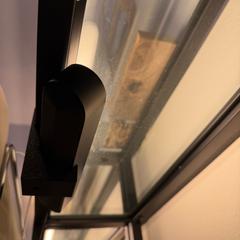
Once I was happy with it, I kicked off a full set and got them installed - no more distracting light bars and a nice line of accent lights along the wall. Eventually I will be able to move them to the upper shelf once I move things back into position. And don't mind the now-highlighted dust...
Comments