I have been a fan of Markdown-based documents for a long time. With AI increasingly preferring it, I started a checklist for best practices and considerations when adding support to web services. Review the following as you consider the requirements of your own implementation.
- Build a text content handler for returning Markdown-friendly responses.
- Implement content negotiation to respect client preferences via
Acceptheader. - Return a Vary header to avoid caching problems when returning multiple content types.
- Add a
linkelement to improve Markdown discoverability of web pages. - Add a
Linkheader for non-HTML, Markdown-supported resources, like PDFs. - Add a
Content-Locationheader to optimize crawler behaviors of negotiated content. - Add a canonical
Linkheader to optimize crawler and indexer behaviors of Markdown links. - Use
curlrequests to verify different negotiation and request patterns.
Example
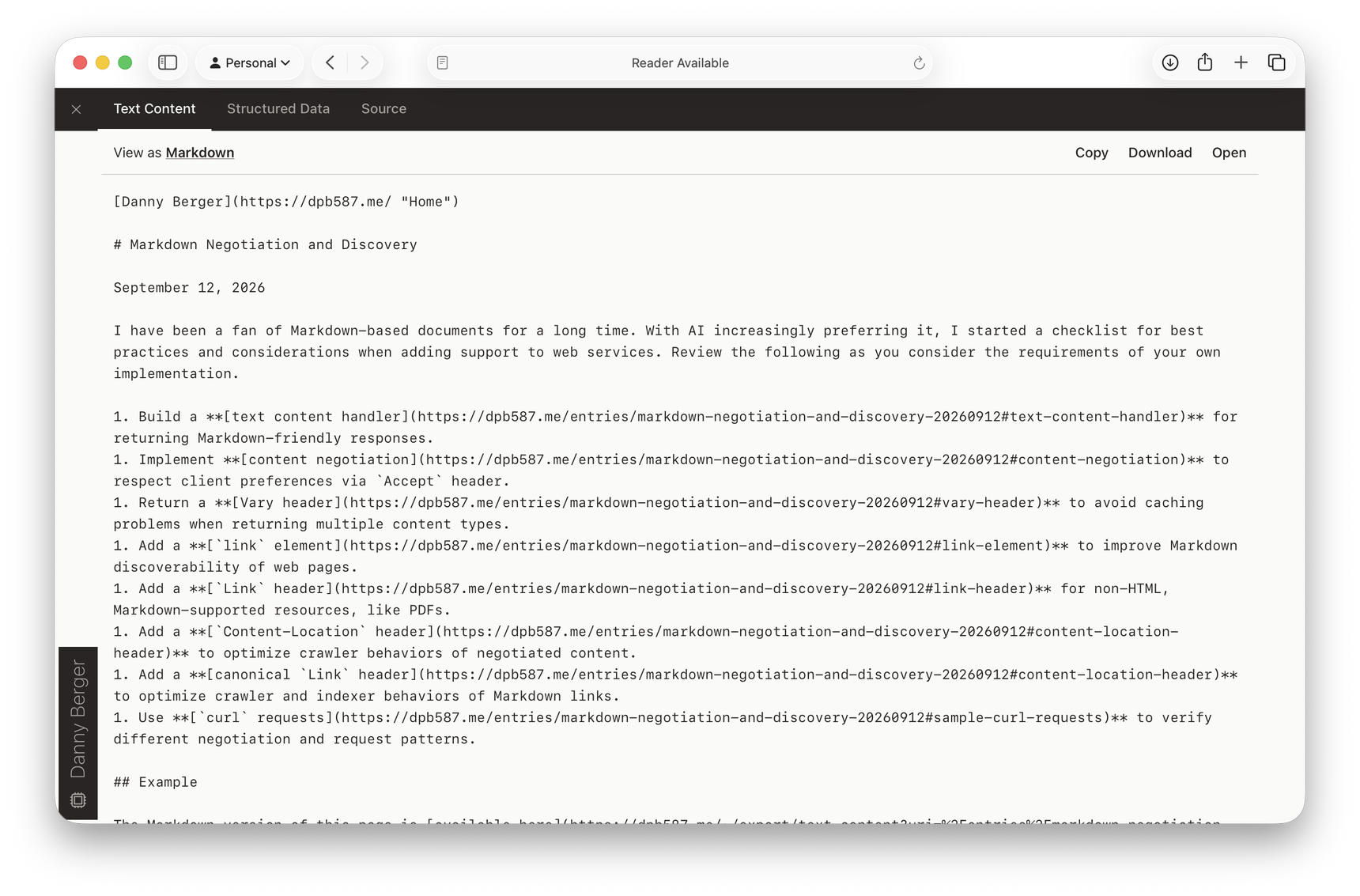
The Markdown version of this page is available here. Or, click </> from the site navigation to inspect this page, including the Markdown, Markdoc, structured data, and more.
Text Content Handler
First, decide how you want clients to access Markdown versions of resources. Here are a few common conventions to consider, though you should prefer any existing website conventions.
- Append Suffix (
/my-web-page.md) – for statically-generated sites and basic application handlers. - Prefix Path (
/markdown/my-web-page) – for mirroring paths under a dedicated namespace. - Negotiation-only (
/my-web-page) – for relying solely on request headers and requires no new URLs. But, I usually avoid this because it is convenient to have and share a direct URL to a text version (without worrying about client negotiation preferences). - Query Parameter (
/my-web-page?format=markdown) – for basic application routers and conditional response logic. I usually avoid this, too, since generic, global parameters likeformatcan easily conflict with other route-specific parameters. - Service-oriented (
/api/markdown?uri=%2Fmy-web-page) – for dedicated endpoints and query parameters.
I prefer the service-oriented approach since it uses an independent route and can have its own set of parameters. As an example, my personal site uses the following API:
Text Content API
GET /~/export/text-content{?uri}{&format}
uri– the canonical URL of the content (e.g./entries/markdown-negotiation-and-discovery-20260912). Notably, this is restricted to local, published resources.format– the syntax to use, defaulting tomarkdown(e.g.markdoc,text).
Markdown Conversion Requirements
How you actually convert web pages or documents to Markdown is beyond the scope of this article. If you're evaluating potential solutions, here are a few basics to consider:
- Dynamic Content – if you rely on JavaScript for dynamic content injection, such as related pages, embedded cards, or top comments, then you may require a virtual browser to fully render content before any text conversions.
- Semantic vs CSS vs ARIA – while it's best practice to use semantic HTML, if your web pages rely heavily on CSS for style or ARIA for semantics, then some converters may struggle to create a matching text representation.
- On-demand vs Static – if content is frequently changing or web pages rely on dynamic content, you may need to support on-demand conversions (potentially with custom caching policies). For a purely static site, text conversions can simply be a part of the publishing pipeline.
- Frontmatter – while not officially part of the syntax, it is fairly common to include some document metadata as a header before the Markdown content. Which fields, if any, you include will be dependent on your clients and their use cases.
- Output Quality – if Markdown will be for human review, well-formatted documents are probably a priority. If AI is the only consumer, excess whitespace, misaligned formatting directives, and minor syntax errors are probably less of a concern.
For my personal site, I'm currently testing Structured Text to improve its clean formatting and Markdoc support; but there are plenty of popular, open source options: markitdown, turndown, and more.
MDX and Shortcodes
Many publishing tools can generate web pages based on text-based source files, including Markdown. However, these tools support extra CMS-specific tags, shortcodes, and local file references which may not correspond to publicly-viewable content. If used directly, the internal terms may inhibit a client's understanding or its discovery of relevant content.
Unless you are intentional about source-level authoring semantics, it is usually better to convert the final, rendered version of a web page into Markdown.
Content Negotiation
The Accept header enables a client to specify a prioritized list of content types that it can receive. For example, web browsers will use Accept to strongly prefer HTML or images, but accept anything else the server has to offer. Recent AI clients use a similar list, but include Markdown as the strongest preference.
When processing a request, the server uses the client-provided Accept list to select the most appropriate response (or may respond with 406 Not Acceptable if nothing matches the client's request). In Go, I use the content-negotiation-go module to handle the server-side parsing and negotiation logic.
// Configure support for both HTML and Markdown pages.
var supportedTypes = contentnegotiation.NewNegotiator("text/html", "text/markdown")

// Define a Markdown flag which will be referenced later when selecting the response.
var sendMarkdown bool

// Negotiate between our supported types and the client's preferences.
negotiatedType, _, err := supportedTypes.Negotiate(r.Header.Get("Accept"))
if err != nil {
  // Client can't accept any of our supported types, return an error.
  // Alternatively, return a server-selected content type and response.
  http.Error(w, http.StatusText(http.StatusNotAcceptable), http.StatusNotAcceptable)

  return
} else if negotiatedType.String() == "text/markdown" {
  // Markdown wins!
  sendMarkdown = true
}
Vary Header
When a response is conditional on request headers (e.g. Accept), you must include those header names in the Vary header of the response.
// Include any other used, conditional headers, too (e.g. Accept-Encoding)
response.Header().Add("Vary", "Accept")
If omitted, a CDN or cache may assume Markdown and HTML pages are equivalent – a browser might receive Markdown instead of HTML, or an agent might receive HTML (even if it asked for Markdown).
Negotiate (not Substring)
It may be tempting to perform a substring search for text/markdown within the Accept header, but you should prefer a dedicated content-negotiation library. A simple substring search is not compliant with HTTP specifications since it ignores client priorities and parameters. For example, each of the following lines has a very different meaning.
Accept: text/markdown, text/html, */*
Accept: text/markdown;q=0.9, text/html, */*
Accept: text/markdown, text/html;q=0.9, */*;q=0.8
An improper negotiation algorithm can lead to clients with edge cases and incorrect assumptions about what content types your service supports.
Link Discovery
Every website has its own conventions for offering Markdown, so clients rely on hints about where Markdown can be found (in addition to content negotiation). The link element and Link header can be used to explicitly inform clients about alternative formats; and the Content-Location header can help clients de-duplicate and optimize the requests they make.
link Element
The link element is used in HTML documents to indicate some relation with another resource, including some discriminating attributes. For example, the following is used in the head element.
<link rel="alternate" type="text/markdown" href="/~/export/text-content?uri=%2Fentries%2Fmarkdown-negotiation-and-discovery-20260912&format=markdown" />Based on rel="alternate" and type="text/markdown", clients can infer that the href URL acts as a Markdown substitute for the current document. Clients may use this information to later retrieve Markdown-specific content or as general metadata to understand how separate URLs are related.
Link Header
Similar to the link element, the Link header indicates a relationship, but at the HTTP layer. This enables servers to include an alternate relationship any type of resource, such as PDFs. If a Markdown-focused client finds a compatible Link in the response headers, it can entirely skip the parsing or downloading of large documents.
response.Header.Add("Link", `</~/export/text-content?uri=%2Fentries%2Fmarkdown-negotiation-and-discovery-20260912&format=markdown>; rel="alternate"; type="text/markdown"`)Content-Location Header
The Content-Location header can be added to all negotiated responses. Assuming you support Markdown-specific requests, this header provides the URL where the same, non-negotiated representation can be retrieved.
GET /entries/markdown-negotiation-and-discovery-20260912 HTTP/1.1
Accept: text/markdown

HTTP/1.1 200 OK
Content-Type: text/markdown; charset=utf-8
Content-Location: /~/export/text-content?uri=%2Fentries%2Fmarkdown-negotiation-and-discovery-20260912&format=markdown
Vary: Accept
Clients may use this information to avoid content negotiation in future requests, and crawlers may de-duplicate these related links during indexing.
Canonical Link Header
In addition to the Link header being used from web pages or PDFs to reference their Markdown alternatives, the inverse should be done, too. From the dedicated, non-negotiated URLs, include rel="canonical" to declare the original, browser-friendly version of content as preferred.
GET /~/export/text-content?uri=%2Fentries%2Fmarkdown-negotiation-and-discovery-20260912&format=markdown HTTP/1.1

HTTP/1.1 200 OK
Content-Type: text/markdown; charset=utf-8
Link: </entries/markdown-negotiation-and-discovery-20260912>; rel="canonical"
Clients can use this header as they de-duplicate links for crawling and when indexing highly-similar content.
Sample curl Requests
After adding support for Accept and Vary, it's a good idea to test it as a client. Here are a few, basic test cases you can use from the command line. Swap the URL with your own and then, for each response, pay close attention to the Content-Type, Vary, and any other headers you have chosen to manage.
First, try a basic request which accepts anything the server prefers to send, typically HTML.
$curl -vo /dev/null 'https://dpb587.me/entries/source-offsets-of-html-dom-nodes-20260415'Output
HTTP/2 200 accept-ranges: bytes alt-svc: h3=":443"; ma=2592000 content-length: 43094 content-type: text/html; charset=utf-8 date: Wed, 09 Sep 2026 15:04:56 GMT last-modified: Wed, 09 Sep 2026 15:01:55 GMT server: Google Frontend vary: Accept, Accept-Encoding via: 1.1 google x-cloud-trace-context: b967b4535a3f893993206a3e99f7cbc6
Next, try explicitly asking for text/markdown, and it should provide a Markdown response.
$curl -vo /dev/null -H 'Accept: text/markdown' 'https://dpb587.me/entries/source-offsets-of-html-dom-nodes-20260415'Output
HTTP/2 200 alt-svc: h3=":443"; ma=2592000,h3-29=":443"; ma=2592000 content-length: 14221 content-location: /~/export/text-content?uri=%2Fentries%2Fsource-offsets-of-html-dom-nodes-20260415&format=markdown content-type: text/markdown; charset=utf-8 date: Wed, 09 Sep 2026 14:59:54 GMT link: </entries/source-offsets-of-html-dom-nodes-20260415>; rel=canonical server: Google Frontend vary: Accept, Accept-Encoding via: 1.1 google x-cloud-trace-context: 8326b0c768e171b9c014e25b4de8c4af
Next, try negotiating by saying you strongly prefer Markdown (via q= parameter), but will accept HTML. Assuming the previous test returned Markdown, you should see it again here, too.
$curl -vo /dev/null -H 'Accept: text/markdown;q=0.9, text/html;q=0.8' 'https://dpb587.me/entries/source-offsets-of-html-dom-nodes-20260415'Output
HTTP/2 200 content-location: /~/export/text-content?uri=%2Fentries%2Fsource-offsets-of-html-dom-nodes-20260415&format=markdown content-type: text/markdown; charset=utf-8 link: </entries/source-offsets-of-html-dom-nodes-20260415>; rel=canonical x-cloud-trace-context: 134ec232f0a6bda2e197cef10c26ad31;o=1 content-length: 14221 date: Wed, 09 Sep 2026 15:15:58 GMT server: Google Frontend vary: Accept, Accept-Encoding via: 1.1 google alt-svc: h3=":443"; ma=2592000
Next, try swapping preferences - strongly prefer HTML, but allow Markdown. If you received HTML in the first test, you should receive it again (or the server is not following the Accept specifications).
$curl -vo /dev/null -H 'Accept: text/markdown;q=0.8, text/html;q=0.9' 'https://dpb587.me/entries/source-offsets-of-html-dom-nodes-20260415'Output
HTTP/2 200 accept-ranges: bytes content-type: text/html; charset=utf-8 last-modified: Wed, 09 Sep 2026 15:01:55 GMT vary: Accept, Accept-Encoding x-cloud-trace-context: 158dd68d29af33861621450b5617d15a;o=1 content-length: 43094 date: Wed, 09 Sep 2026 15:18:32 GMT server: Google Frontend via: 1.1 google alt-svc: h3=":443"; ma=2592000
Finally, verify what happens when a client asks for an unacceptable content type. For a website primarily serving web pages, I tend to ignore the negotiation error and return the default, HTML content; but a 406 Not Acceptable response status is the more technically-correct choice.
$curl -vo /dev/null -H 'Accept: application/unknown-content-type' 'https://dpb587.me/entries/source-offsets-of-html-dom-nodes-20260415'Output
HTTP/2 200 accept-ranges: bytes content-type: text/html; charset=utf-8 last-modified: Wed, 09 Sep 2026 15:01:55 GMT vary: Accept, Accept-Encoding x-cloud-trace-context: 158dd68d29af33861621450b5617d15a;o=1 content-length: 43094 date: Wed, 09 Sep 2026 15:18:38 GMT server: Google Frontend via: 1.1 google alt-svc: h3=":443"; ma=2592000
Comments