Before unboxing the printer, I ended up watching the following videos to get a bit more familiar with the basics of my new Bambu Lab X2D...
 Bambu Lab X2D Unboxing Guide
- Bambu X2D unboxing and setup. I HAD too
- 10 ESSENTIAL Bambu X2D First Prints
- Bambu AMS-HT - OVER 30 things I wish I knew first
- Bambu Studio & Handy App: Your First Print Step-by-Step
- X2D Deep Dive: Dual Nozzles, Bowden Extruder & Real 3D Prints
After moving around some furniture and making space for the new setup, it was finally time to unbox and unwrap. It was mostly straightforward, aside from a couple quirks:
- When attaching the touchscreen, one of the edge lips of the plastic cable holder snapped off even though I was being carefully. It might be an inconvenience if/when I need to remove the cable in the future, but it didn't seem to affect anything else.
- My first sample print attempt from the touchscreen failed with an "unrecognized plate" error. A Reddit suggestion proved correct to power cycle, update the firmware, and try again. Interestingly, I had gone to check the firmware for updates beforehand, but didn't see an option; after rebooting it became available. After the update, it wanted another calibration for vibration/noise and then it was ready.
First Print
Finally, I was able to print my first Benchy sample in PLA True Red! It was a bit magical to watch the machine move around, and the timelapse videos are a fun artifact, too.
Filament Spool Tires
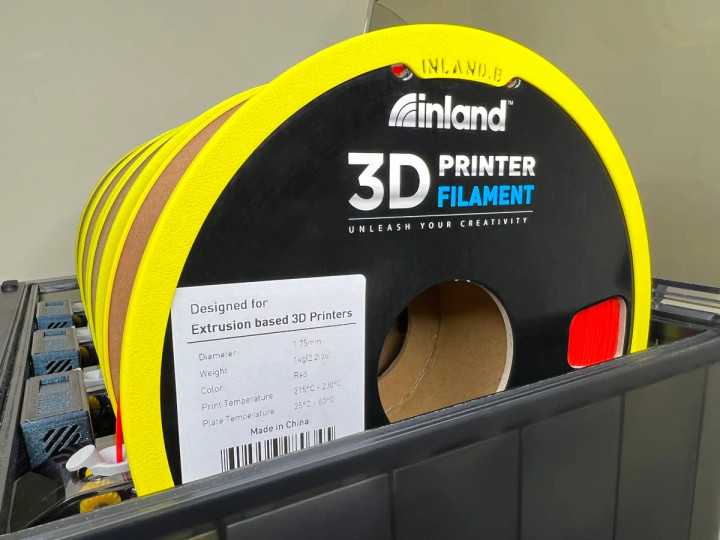
I saw recommendations that cardboard filament spools (like the ones packaged with Inland) should not be used directly, at least not for long. Over time, the cardboard wears down from the rollers and can cause more dust instead of the AMS. For a more practical test, I printed a pair of these tires. Despite some reviews saying they didn't fit the AMS or scratched it, they worked fine.

Download this free 3D print file designed by DesignCraft. DISCLAIMERS:Print profiles NOT created by DesignCraft may contain outdated model versions or suboptimal slicer settings. Use at your own risk! I have no control to moderate or remove these third party print profiles.INLAND PLA+ spools have recently been reported by several users to be slightly larger. If your spool diameter is greater than 199mm please scale the models to 100.6% and leave a comment if this works for you. I don't have a matching spool to test so your feedback is important!Description: This adapter system wraps the edges of an INLAND 1kg 199x64mm cardboard spool in order to:provide smooth rotation within a Bambu Lab AMSprevent carboard debris from depositing within a Bambu Lab AMSFeatures:ReusableINLAND nameplate for easy identification when reusingInstructions:Print INLAND.A for the left-hand side and INLAND.B for the right-hand sideAffix to each respective side of the INLAND spoolSee attached photosNotes:The reason for separate models is that the spool's wall width is thicker on the side with the branding label.I'm not sure if all INLAND spools are wound in the same direction so if the branding label is on the opposite side you may need to swap the rings from what I have here in the instructions.It may help if you remember that INLAND.B is for the Branding side of the spool.Considerations:Print Material: Please print with a basic PLA or PETG to minimize any shrinkage.Too Tight? Too Loose? Cardboard expands with humidity and contracts when dried. A cardboard spool that has absorbed too much moisture may cause the adapters to fit very tight. Placing the spool in a filament dryer, such as the SUNLU S2, for a bit should resolve this. Note, you should not dry the spool with the adapters attached as they can warp in the heat. Keep in mind that after a long drying session the adapters may fit too loose. This should resolve itself shortly as the cardboard reabsorbs some moisture from the air.AMS Lid Doesn't Close? All of the spool adapters I make are less than the official AMS spool clearance limit of 202mm, as specified on the official AMS product page, and as tested within my own AMS. However, some people have stated their spools are rubbing against the lid with the adapters attached. It's hard to say what's causing this since I cannot reproduce the issue myself, however, I've created an AMS Lid Riser which allows you to keep your AMS lid closed while providing additional clearance for larger filament spools. It's a quick and easy print which you can find on my profile or directly here: https://makerworld.com/en/models/33133
Comments