[Danny Berger](https://dpb587.me/ "Home")
# 3D Printing, Filament Labels
[3D Printing Journal](https://dpb587.me/topics/3d-printing/journal) · August 24, 2026
My new workbench arrived, so I got it assembled and moved the equipment on to it (and then ran a recalibration). I also added desiccant to the printed filament spool containers and installed them. Then I started learning more about OpenSCAD...
## Filament Labels
There are almost too many models on MakerWorld for labels and swatches, but none of them quite matched my preferences. I wanted something fairly simple (not articulated), medium size (not small/nano), label sticker with QR note links (not 3D-printed names; preferably for 30336 size I already use), and didn't require special attachments for keeping it with filament spools.
At some point, I found a [filament sample](https://makerworld.com/en/models/37649-filament-sample#profileId-36104) which included its OpenSCAD model file, so I was able to see how it worked and realize I could easily recreate my own layout. After some trial & error and a couple printed iterations, I ended up on a version that I think will work for me.
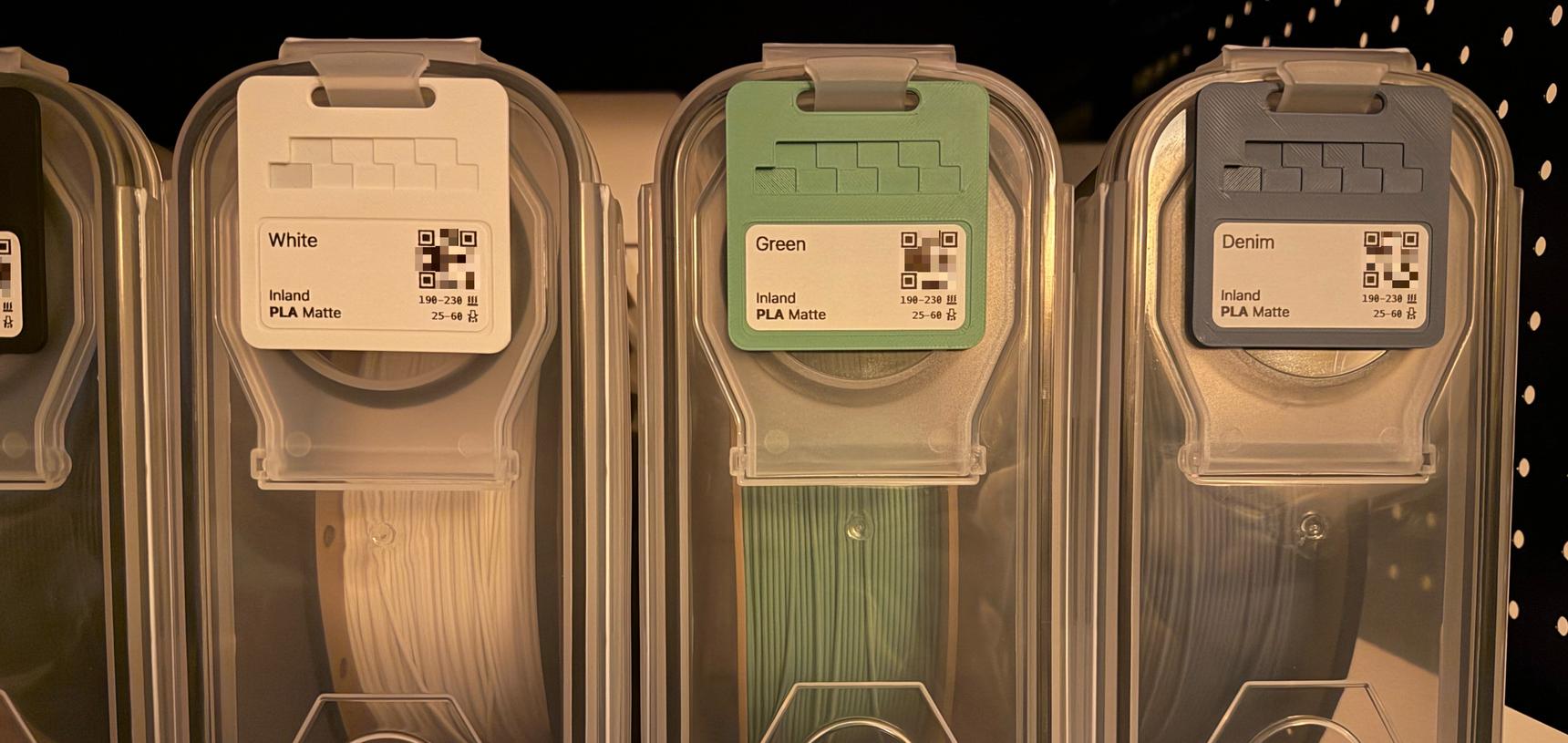
Filament samples hanging on air-tight containers
Filament Sample 3D Model
Print Timelapse - Filament Sample
Source Code
The OpenSCAD model I used...
[FilamentSample.scad](https://github.com/dpb587/dpb587.me/blob/main/appendix/2026-08-24-3d-printing-filament-labels/FilamentSample.scad)
```
$fn = $preview ? 32 : 512;
module rounded_cube(size, radius, height) {
hull() {
translate([radius, radius, 0]) {
cylinder(h = height, r = radius);
}
translate([size[0] - radius, radius, 0]) {
cylinder(h = height, r = radius);
}
translate([radius, size[1] - radius, 0]) {
cylinder(h = height, r = radius);
}
translate([size[0] - radius, size[1] - radius, 0]) {
cylinder(h = height, r = radius);
}
}
}
module rounded_cylinder(w, r, h) {
hull() {
translate([r, r, 0]) {
cylinder(h = h, r = r);
}
translate([w - r, r, 0]) {
cylinder(h = h, r = r);
}
}
}
difference() {
rounded_cube([64, 64], 5, 2);
// label
translate([4, 4, 1.8]) {
rounded_cube([56, 27], 2.5, 0.2);
}
// notch
translate([17, 57, 0]) {
rounded_cylinder(30, 2.5, 3);
}
translate([16.6, 56.6, 0]) {
rounded_cylinder(30.8, 2.9, 0.2);
}
translate([16.8, 56.8, 0]) {
rounded_cylinder(30.4, 2.7, 0.4);
}
translate([16.6, 56.6, 1.8]) {
rounded_cylinder(30.8, 2.9, 0.2);
}
translate([16.8, 56.8, 1.6]) {
rounded_cylinder(30.4, 2.7, 0.4);
}
// swatch
translate([7, 38, 0.2]) cube([10, 6, 1.8]);
translate([12, 44, 0.4]) cube([10, 6, 1.6]);
translate([17, 38, 0.6]) cube([10, 6, 1.4]);
translate([22, 44, 0.8]) cube([10, 6, 1.2]);
translate([27, 38, 1.0]) cube([10, 6, 1.0]);
translate([32, 44, 1.2]) cube([10, 6, 0.8]);
translate([37, 38, 1.4]) cube([10, 6, 0.6]);
translate([42, 44, 1.6]) cube([10, 6, 0.4]);
translate([47, 38, 1.8]) cube([10, 6, 0.2]);
}
```
The basic HTML template I used...
[Label-30336.html](https://github.com/dpb587/dpb587.me/blob/main/appendix/2026-08-24-3d-printing-filament-labels/Label-30336.html)
```
Label 25-60-8.pdf
```
## AMS 2 Pro Filament Tag Holder Print
I printed a tag holder for the AMS, reusing one of the public models which my swatches happen to fit. I used mostly the default settings based on the strong suggestion in the MakerWorld description, but it printed extremely slowly. I assume it was overly-configured for what seems like a simple print; next time I would look more closely.
[Clip-On Filament Tag Holder for AMS & AMS 2 Pro - Free 3D Print Model - MakerWorld](https://makerworld.com/en/models/3072960-clip-on-filament-tag-holder-for-ams-ams-2-pro#profileId-3514778)
[makerworld.com](https://makerworld.com/en/models/3072960-clip-on-filament-tag-holder-for-ams-ams-2-pro#profileId-3514778)
[Download this free 3D print file designed by MMSK2. Clip-On Filament Tag Holder for AMS & AMS 2 ProIf you like to keep your Filament Tags with the spools loaded in your AMS, simply hang the matching tags on the Filament Tag Holder whenever you load or swap a spool. ⚠️ Please read the print profile descriptions carefully before printing.This Clip-On Filament Tag Holder consists of two separately printed parts, and a snug fit between them is essential for the holder to work properly. You need to print both the Filament Tag Holder and the Retainer Clip. Different printers, materials, and print settings can affect the tolerances between these parts. Alternative retainer clip clearances are provided if needed. Compatible with Filament Tags for Dry Boxes: https://makerworld.com/nl/models/3002234-filament-tags-for-dry-boxes#profileId-3370859Key DetailsCompatible with both the Bambu Lab AMS and AMS 2 ProSecure snap-on fit with a separate retainer clipNo screws, magnets, glue, or other hardware requiredClean, minimalist design that blends in with the printer and AMSDoesn't block the display on AMS silica gel holder systems with a center-mounted hygrometerPrinting⚠️ Two Print Profiles – You Need Both!This model requires two separate print profiles:V2 - Filament Tag HolderV2 – Retainer Clip – standard 0.10 mm clearanceYou need to print BOTH profiles to install and use the Clip-On Filament Tag Holder. The holder is not designed to be used without the Retainer Clip.Fit & ClearanceThe Filament Tag Holder and Retainer Clip should fit snugly and securely together. This fit is important for keeping the holder securely attached to your AMS. Small differences between printers, filament types, and print settings can affect the tolerances between the two parts. I recommend starting with the 0.10 mm clearance Retainer Clip, included in the second print profile: V2 – Retainer Clip. If the clip is too loose, use the additional Alternative Retainer Clips print profile to find the clearance that works best for your setup. Each test clip takes only a few minutes to print and uses just a few grams of filament, making it easy to compare them and keep the one that fits best. If a Retainer Clip is too tight, try holding it in warm (not boiling) water for a few seconds to soften it slightly. Then press it into the Filament Tag Holder on a flat, smooth surface. Let it cool for a few moments before installing the holder on your AMS. The Clip-On Filament Tag Holder has been extensively tested with Bambu Lab PLA Basic on my P2S Combo. For the best results, I recommend using the included print profiles without changing the settings. Explore the Filament Tag CollectionThis model is part of the growing Filament Tag Collection: a series of compatible tags and accessories designed to keep your filament collection organized. Want to stay up to date? Follow the collection to be notified whenever new accessories and print profiles are released. https://makerworld.com/nl/collections/31429718-filament-tag-collection Available NowFilament Tags for Dry Boxeshttps://makerworld.com/nl/models/3002234-filament-tags-for-dry-boxes#profileId-3370859 FIlament Tag Holder for AMS & AMS 2 Prohttps://makerworld.com/nl/models/3211195-filament-tag-holder-for-ams-ams-2-pro#profileId-3634893 Clip-On Filament Tag Holder for AMS & AMS 2 Prohttps://makerworld.com/nl/models/3072960-filament-tag-holder-for-ams-ams-2-pro#profileId-3459611 FIlament Tag Holder for AMS HT https://makerworld.com/nl/models/3163270-filament-tag-holder-for-ams-ht#profileId-3575239 Universal Mount for Filament Tagshttps://makerworld.com/nl/models/3240935-universal-mount-for-filament-tags#profileId-3672021 Filament Tag Gridfinity Storage Trayhttps://makerworld.com/nl/models/3087041-filament-tag-gridfinity-storage-tray#profileId-3477638 Magnetic Filament Tag Holdershttps://makerworld.com/nl/models/3102881-magnetic-filament-tag-holders#profileId-3497685 Filament Tag Holder for SKÅDIS Pegboardhttps://makerworld.com/nl/models/3078831-filament-tag-holder-for-skadis-pegboard#profileId-3467169 Missing Something?Looking for a different filament brand, material, color collection, or mounting option? Just leave a comment! Boost MeA Boost, Like or Review is always greatly appreciated. And if you print it, I'd absolutely love to see a photo of your setup in the comments! ](https://makerworld.com/en/models/3072960-clip-on-filament-tag-holder-for-ams-ams-2-pro#profileId-3514778)
Print Timelapse - AMS 2 Pro Filament Sample Holder
## Albuquerque Topology Print
I tried a topology print of my area - the Sandia Mountains and Rio Grande valley - that was listed publicly. It seemed like someone's experiment since it had some excess ground layers, so I tried some more of the BambuStudio tools to trim it. I also tried scaling the Z axis for slightly more exaggeration of the elevations.
[Albuquerque and Sandia Mountain - Free 3D Print Model - MakerWorld](https://makerworld.com/en/models/1188696-albuquerque-and-sandia-mountain#profileId-1200103)
[makerworld.com](https://makerworld.com/en/models/1188696-albuquerque-and-sandia-mountain#profileId-1200103)
[Download this free 3D print file designed by cheeks. This model was created with elevation data of Albuquerque, NM USA and Sandia Mountain. Albuquerque rests on the Rio Grande rift valley. On the eastern edge of the rift, the Sandia Mountains were lifted up and tilted. In the model you can see the gentle slope on the east side and the dramatic cliffs on the west side which form the view for people in the city. At sunset the west facing cliffs glow a deep purple, which is how they got their name (sandia is spanish for watermelon). The print profile has a relatively high infill (25%) which I did to cause slightly faster color change with rainbow filament. It prints fine with less infill so adjust to taste.](https://makerworld.com/en/models/1188696-albuquerque-and-sandia-mountain#profileId-1200103)
Print Timelapse - Albuquerque Topology
## ABS Galaxy Black
I ran a drying cycle for the ABS Galaxy Black (70º for 6hr). After it was complete, I was going to print a swatch sample, but got a warning that ABS apparently should not be used with the external extruder? Tried to move it inside the AMS 2 Pro, but the spool was slightly too large and couldn't rotate properly. Still need to figure out how it should normally be handled.
## Related
[3D Printing Journal](https://dpb587.me/topics/3d-printing/journal/)
[**3D Printing, Week 2**](https://dpb587.me/entries/20260822-3d-printing-week-2/)
[Previous · 2026-08-22](https://dpb587.me/entries/20260822-3d-printing-week-2/)
[Dessicant spools; Paris](https://dpb587.me/entries/20260822-3d-printing-week-2/)
Copyright © 2026 // [dpb587.me](https://dpb587.me/) is a [personal](https://dpb587.me/projects/website), [open source](https://github.com/dpb587/dpb587.me/blob/main/content/post/2026/20260824-3d-printing-filament-labels/_index.md) site.

